Use case – Tableau Upgrades
Confident Tableau Upgrades, Without Disruption
Upgrades are not optional, and on Tableau Cloud they are not even yours to schedule. Wiiisdom validates every dashboard against a pre-upgrade baseline, so you find what changed weeks before your users do.
Trusted by more than 600 leading companies and organizations
Dimensions that matter most for upgrades
What it does
Upgrade on your terms, not on your luck.
Spot the difference, automatically
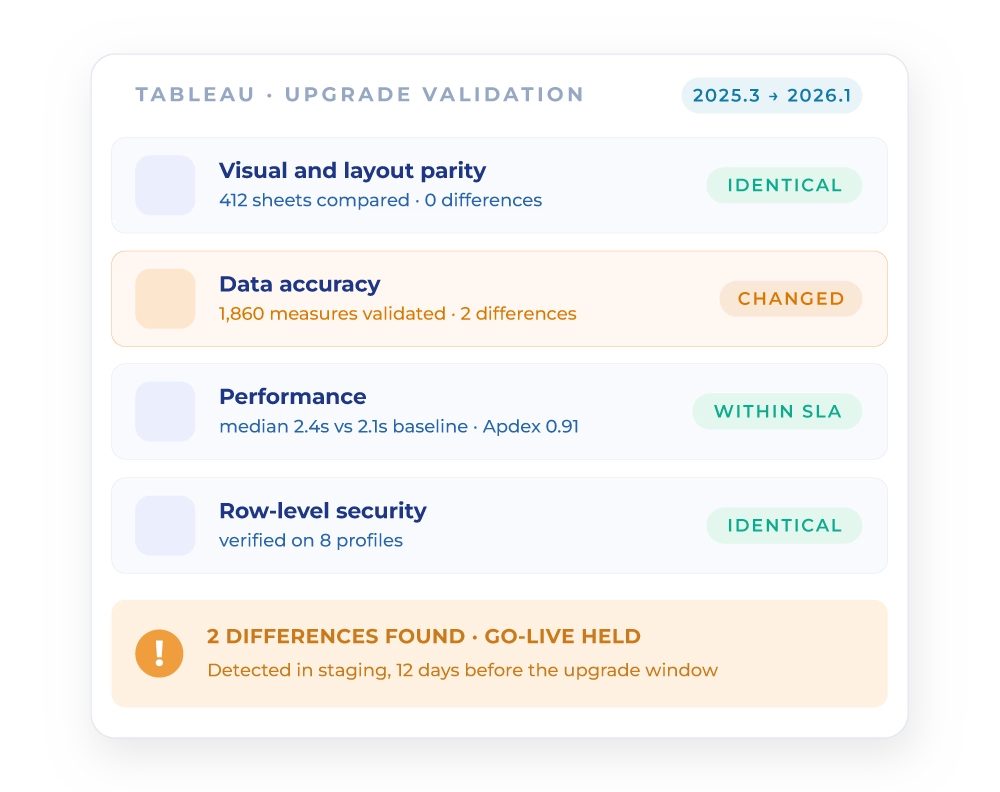
Instantly compare dashboards before and after any upgrade. Wiiisdom highlights every change in data, layout, or performance, so nothing slips through. What used to be a weekend of manual spot-checks becomes a suite that runs while you sleep.
Stay ahead of forced Cloud upgrades
Tableau Cloud releases arrive on Tableau’s schedule, not yours. Test new releases in a Release Preview Site weeks before go-live: Wiiisdom’s automated regression tests flag issues while there is still time to remediate, rather than on the morning everything switches over.
Confirm performance held
An upgrade that keeps every number correct can still make every dashboard slower. Wiiisdom measures response times, concurrency and Apdex scores against your pre-upgrade baseline, so a regression in speed is caught with the same rigour as a regression in data.
Audit-ready, always
Every test is logged, every result is tracked. Prove that the environment your regulators rely on came through the upgrade intact, in clicks rather than in paperwork.
What we test
What we test, automatically
Visual and layout parity
Sheets present, positions consistent, visual elements intact.
Data accuracy
Measures and marks validated across versions and environments.
Performance and scalability
Response times, concurrency, Apdex scores, and SLA compliance.
Access and security
Row-level security verified per user profile, before and after.
Functional behaviour
The view opens, and filters, parameters and actions behave as they should.
How it works
How it works, on Cloud or on Server
Step 01
Select scope
Prioritize executive, regulated and heavily used dashboards. You do not need to test everything to de-risk an upgrade, you need to test what matters.
Step 02
Baseline
Capture pre-upgrade results and performance metrics. That baseline is what every later comparison is measured against.
Step 03
Upgrade safely
On Cloud, use Release Preview Sites. On Server, upgrade a staging environment. Run the regression and performance suites, and compare to baseline.
Step 04
Fix fast
Review the validation pipeline logs, get alerted, remediate, and re-test until green. Then promote with evidence rather than with hope.
The payoff
From an upgrade weekend everyone dreads to a scheduled, evidenced event.
The fear around upgrades is not really about the upgrade. It is about not knowing what it changed. Wiiisdom replaces that uncertainty with a comparison against a baseline, run at a scale no team could reach by hand.
- A handful of dashboards are checked by hand, over a weekend
- Cloud releases arrive on Tableau's schedule, and nobody is ready
- Layout and filter changes are found weeks later, by users
- Performance regressions go unnoticed until people complain
- Sign-off rests on a sample and a degree of hope
- Every critical workbook compared against its pre-upgrade baseline
- New Cloud releases validated in preview, weeks before go-live
- Layouts, filters, parameters and values all compared, not just totals
- Response times and Apdex scores measured against the baseline
- A timestamped record of every comparison, ready for audit