Tableau Testing – Performance
Performance and Load Testing for Tableau
Build and automate performance and load tests without code. Guarantee reliable access to Tableau content, hold your environment to defined SLAs, and catch degradation before users, or your cloud database bill, ever feel it.
Trusted by more than 600 leading companies and organizations
Seven BI testing dimensions – Wiiisdom for Tableau
What it does
“Fast enough”, defined and measured.
Ensure optimal performance across your environment
Slow analytics is one of the most common obstacles to scaling adoption. Wiiisdom identifies bottlenecks and helps you fine-tune resource allocation across Tableau Server and Tableau Cloud, so analytics stays fast and reliable and users keep coming back.
Assess every dashboard individually
Performance varies enormously with design complexity, data volume, and user interaction. Deep dive into each dashboard: verify that filters, parameters, and actions execute within acceptable duration, and pinpoint exactly what to optimize.
Define and enforce analytics SLAs
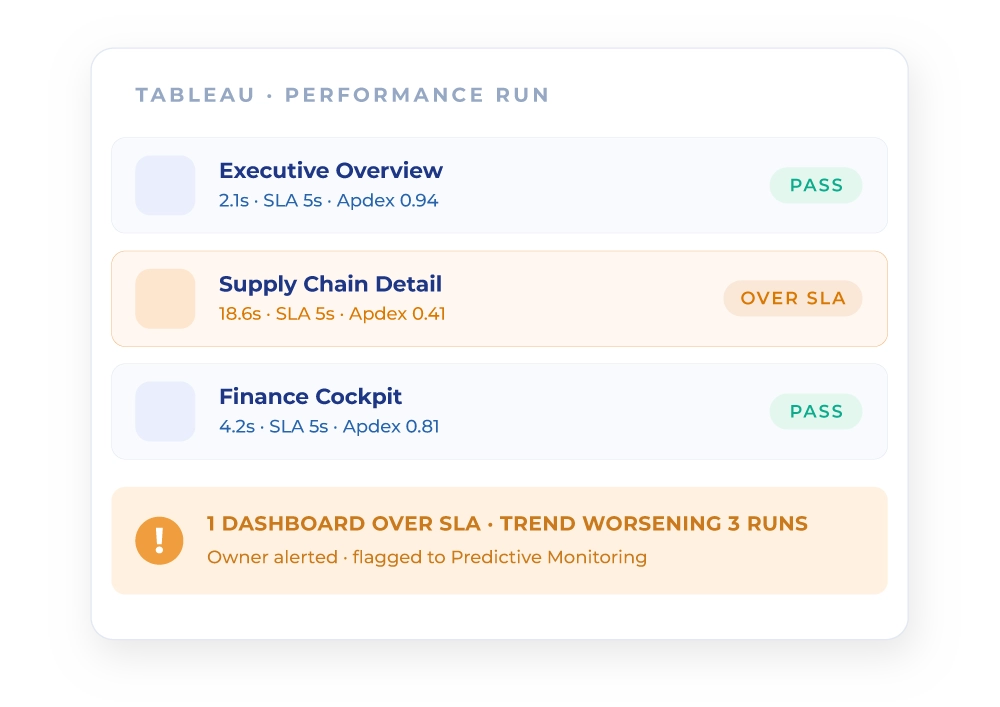
Set performance and availability targets, including desired Apdex scores, and hold your environment to them. Wiiisdom’s no-code approach makes it straightforward to specify test conditions: concurrent clients, dashboards under test, and simulated user profiles.
Control costs, not just latency New
A heavy dashboard is not only a slow dashboard, it is an expensive one. Performance testing surfaces the compute-heavy content and inefficient queries that quietly drive your Tableau platform and cloud warehouse bills, so you can fix them before the cost compounds.
Key capabilities
No code. On Server and on Cloud.
The payoff
From user complaints to defined SLAs.
Performance managed reactively means you learn about it last, from the people it already affected. Wiiisdom replaces complaints with thresholds, and firefighting with trends you can see coming.
- You discover a dashboard is slow when a user complains about it
- “Fast enough” is an opinion, with no threshold to test against
- Behavior under load stays unknown until a peak reveals it
- Optimization targets whatever was complained about most recently
- Compute-heavy content keeps running and keeps billing, unnoticed
- Rendering and load tested continuously, on Tableau Server and Tableau Cloud
- Apdex scores and SLA thresholds define “fast enough” objectively
- Peak behavior validated before the peak, with simulated concurrency
- Degradation trends surface while they are still trends, not outages
- Heavy-footprint content identified at the asset level, with its cost attached
Agentic analytics governance
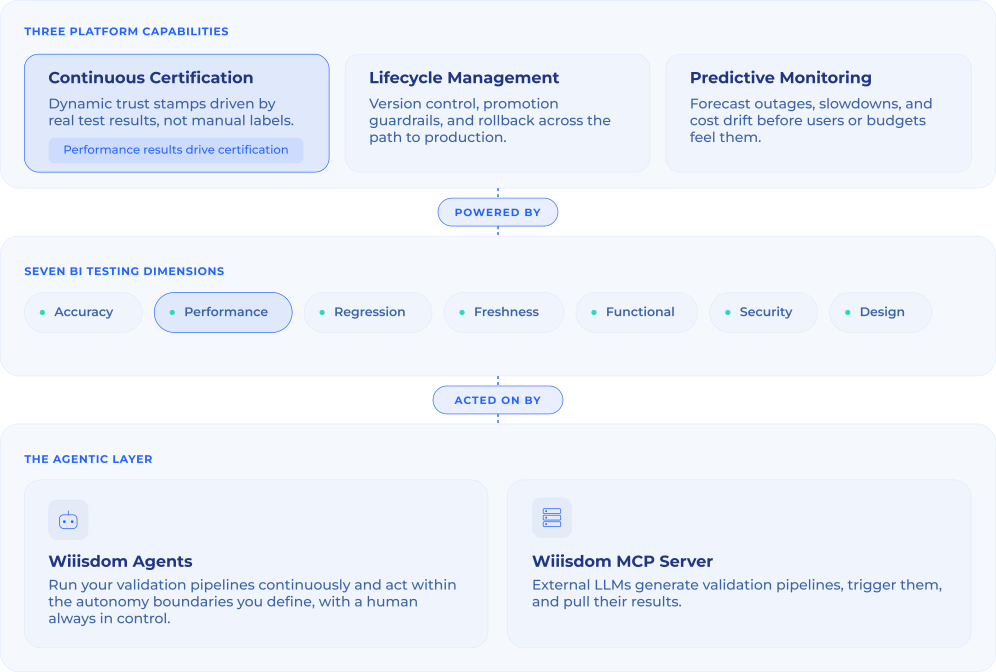
Performance is one of seven BI testing dimensions.
Testing is the foundation. It powers the three capabilities of the Wiiisdom platform.
Keep exploring