Tabjolt vs. Wiiisdom for Tableau
Overcoming The Limitations of Tabjolt for Tableau Testing

Every decision should be based on trustworthy analytics. Yet, ensuring that dashboards and reports are reliable, performant, and ready for action is a challenge, especially as analytics environments grow in complexity. Performance and load testing are essential, but not all solutions offer the governance, automation, and clarity needed to support confident decision-making at scale. This article compares Tabjolt and Wiiisdom for Tableau, and why Wiiisdom for Tableau is the best choice to perform performance and load testing on your Tableau Server environment.
What is Tabjolt?
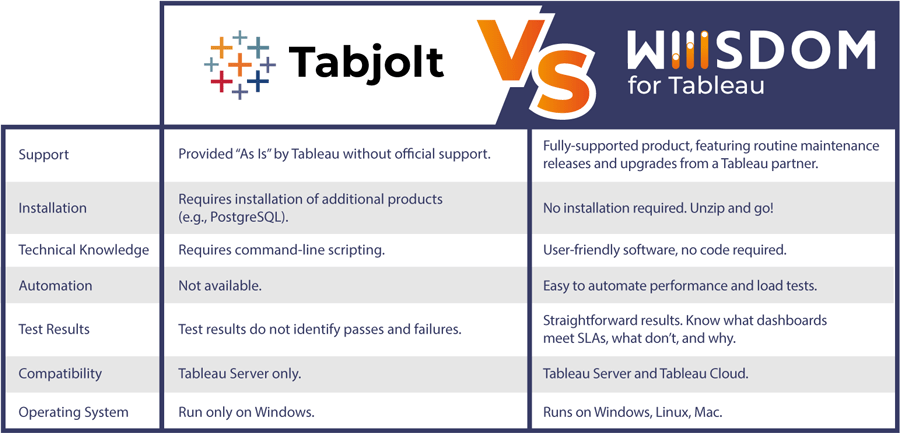
Tabjolt is a load and performance testing tool for Tableau Server. It simulates user actions and collects data to evaluate Tableau’s performance under load and extreme stress conditions. Tabjolt is provided “As-Is” by Tableau, which means there is no formal technical support for it, and any kind of support is done only through the Tableau Community. You can find the latest information about Tabjolt from their Github site.
Tabjolt Limitations
Tabjolt was designed for load and performance testing of Tableau Server. However, it does come with certain limitations that users should be aware of:
- Lack of Official Support: As mentioned earlier, Tabjolt is provided “As-Is” without official support from Tableau. This means that any issues or vulnerabilities may take longer to resolve.
- Complex to use: Tabjolt requires technical proficiency (namely, command-line scripting) to install, configure, and execute performance and load tests.
- PostgreSQL Dependency: For Tabjolt to save its results, PostgreSQL must be installed. However, some organizations restrict the use of PostgreSQL.
- Ambiguous Results: Test results must be analyzed in a Tableau workbook. The differentiation between “passes” and “failures” is not explicitly defined, leading to ambiguity in interpreting results.
- Tableau Server Only: Tabjolt only supports performance and load testing for Tableau Server. You cannot use Tabjolt with Tableau Cloud.
Why choose Wiiisdom for Tableau?
Anyone, from Tableau Server admins to developers, can build and automate performance and load tests without the need for Tabjolt. This means you can continually validate that users will have uninterrupted access to Tableau content.
Easy to Use
Wiiisdom for Tableau is a user-friendly solution that simplifies performance and load testing by eliminating the need for complex command-line scripting in test setup, configuration, and execution. With Wiiisdom’s solution, you can easily establish SLAs, set a desired Apdex score (a standard that measures user satisfaction with web applications), and define test conditions using a no-code approach, making Tableau Server performance testing comprehensive and easy.
Clear Results
Wiiisdom simulates traffic to dashboards, measuring load times from the user’s point of view. This data is benchmarked against predefined SLAs, providing clear insights into test results (satisfactory versus frustrating experience). This enables you to take targeted action to improve Tableau Server performance.
Real Load Simulation
When Wiiisdom for Tableau runs a performance test it is triggering the local browser (either Chrome or Edge) to simulate actual browser activity. This means multiple browser sessions are used to simulate a user(s) accessing Tableau Server, logging on, and opening one or more published views simulating real load against the Tableau Server environment. Wiiisdom for Tableau also uses a special algorithm to be as random as possible to simulate a real-world experience.
Realistic User Experience
Wiiisdom for Tableau delivers a realistic approach to performance testing by simulating real user behavior. Wiiisdom simulates the user journey using its Functional Tests: it opens a browser, logs in, navigates dashboards, interacts with filters and parameters, and validates data accuracy. Because it behaves like a human would when accessing a Tableau environment, it captures critical factors such as caching, pacing, and real rendering times. The result is a true end‑to‑end view of how dashboards perform under real-world conditions—providing insights that are far more precise, actionable, and aligned with actual user experience.
Automated and Integrated
It’s also easy to automate performance tests so you can discover performance issues proactively. Additionally, these quality checks can be integrated into a broader set of validations (focused on accuracy, functionality, and security) or even a CI/CD framework, ensuring that Tableau content is available and reliable for decision-making.
Fully-supported Solution
Wiiisdom is a Tableau partner and has been pioneering Analytics Governance for business intelligence platforms for almost 20 years. Wiiisdom for Tableau, unlike Tabjolt, is fully supported by Wiiisdom’s Support organization. We deliver routine maintenance releases and upgrades—addressing potential vulnerabilities and bugs along the way—to ensure users have a secure, reliable, and current tool for performance testing.
Wiiisdom for Tableau Functional Testing
On top of Performance Testing (or testing a number of users and views in bulk), you can use Wiiisdom’s Functional Testing (as mentioned earlier) to go deeper into individual dashboard performance experience by using specific tasks:
- OpenViz = how long does it take to render the viz?
- Set Filter = If a filter item is selected, how long does it take to update the viz?
- Data Rules = If a calculation is used to determine if Today’s date is used, how long does that take?
- Browser task = if a HTML button is used to change to another dashboard, can we test that button and how long does it take to switch to the target dashboard?
By combining Performance Testing and Functional Testing, you can start with a population of users and published views to see how the entire Tableau Server performs, but then drill down to the individual dashboard level.
Summary
While Tabjolt and Wiiisdom for Tableau serve as performance and load testing solutions, Wiiisdom distinguishes itself with its user-friendly setup, clear results, automation features, and comprehensive support. This post barely scratches the surface of Wiiisdom’s advantages. Don’t hesitate to get in touch and try Wiiisdom for your performance validation requirements.