All You Need To Know About Functional Testing For Tableau Dashboards
Why Tableau Functional Testing Matters More Than Ever
Calling all Tableau users: have you ever gone to open your Tableau dashboard and it won’t open? Have you ever changed one or two filters and the visual went blank, or had bad values? Has a certain interaction not worked for you? These can be daily annoyances that reduce your dashboard adoption or success, but they can be turned around. Cue: functional testing. Functional testing for Tableau is aimed at Dashboard and reports developers, BI Managers, or dashboard users who want to trust their dashboards will work. Before users even pick up on data regressions (which aren’t always easy to spot), users will immediately know if the dashboard opens or not, or if they can’t interact in the way that they would like to. This is why functional testing combined with automation is the ideal setup for trusted Tableau dashboards.
What is Functional Testing For Tableau?
Functional testing englobes the following topics:
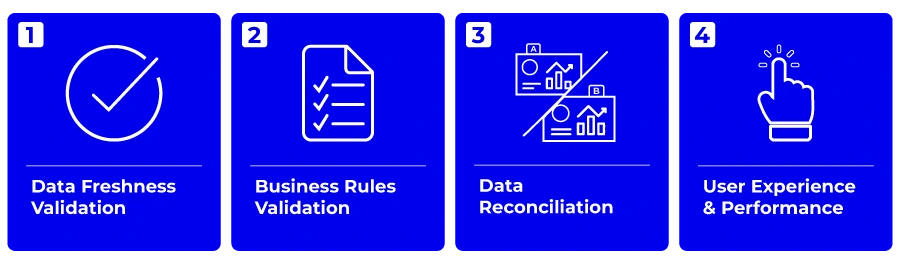
1. Data Freshness Validation
Ensures that data at all levels (raw data, transformed data, semantic layer, and in the visuals) is validated and up-to-date.
Verifies that data refreshes are occurring as scheduled, so users always see the latest information.
👉🏻 Read our blog on how to validate your data is up-to-date on your Tableau dashboards
2. Business Rules Validation
Confirms that dashboards display results according to user-defined business rules.
Checks that calculations, KPIs, and logic embedded in the dashboard are functioning as intended.
3. Data Reconciliation
Validates that the data shown in Tableau matches the source of truth (source data or transformed data).
Detects discrepancies between what’s in the dashboard and the underlying data sources, helping to prevent reporting errors.
4. User Experience & Performance
Tests interactive elements such as filters, dropdowns, and navigation to ensure they work correctly.
Measures dashboard and interaction load times (including load times of applying a fulter, a parameter or selecting a mark).
This article will focus on the User Experience topic and ensuring you’re providing the best experience for your users. For example, in a self-service BI model, it’s critical to implement Tableau governance rules, in this particular case, content governance rules. Part of the process is to ensure that everything is working well and that users can confidently consume the relevant dashboard content. If you want to ensure high user adoption, functional testing is a must. If dashboards aren’t refreshing or displaying the correct information, users won’t use it and they will lose trust, which in turn will lead to less user adoption. Let’s be honest, the first problem your Support team will get is “why isn’t my dashboard working?”
How Are Organizations Using Functional Testing?
A leading financial services provider recently transformed their Tableau user experience with Wiiisdom. Facing complaints about slow dashboards, broken filters, and inconsistent results, they implemented automated functional testing as part of their Analytics Governance strategy.
Thanks to Wiiisdom for Tableau, each time a dashboard is built or modified, a dashboard developer leverages Wiiisdom for Tableau to run functional validation to simulate a user journey with the key functionalities below:
- Is the dashboard opening?
- Are the filters working?
- Are my formulas showing data within the range I had planned?
How do you implement functional testing in Wiiisdom?
Every test case in Functional Tests is made up of a series of tasks to give you the flexibility to model how Tableau reports are used by members of your organization. What’s important to note is that when running a test case, Wiiisdom for Tableau follows the tasks in the sequence you’ve set them up, but even if a task is a failure, your test will continue running. In terms of the results, you will see how long each test took, e.g. logging on, opening a workbook. Plus if you really want to be proactive, you can set up email and Slack notifications to notify you of the results.
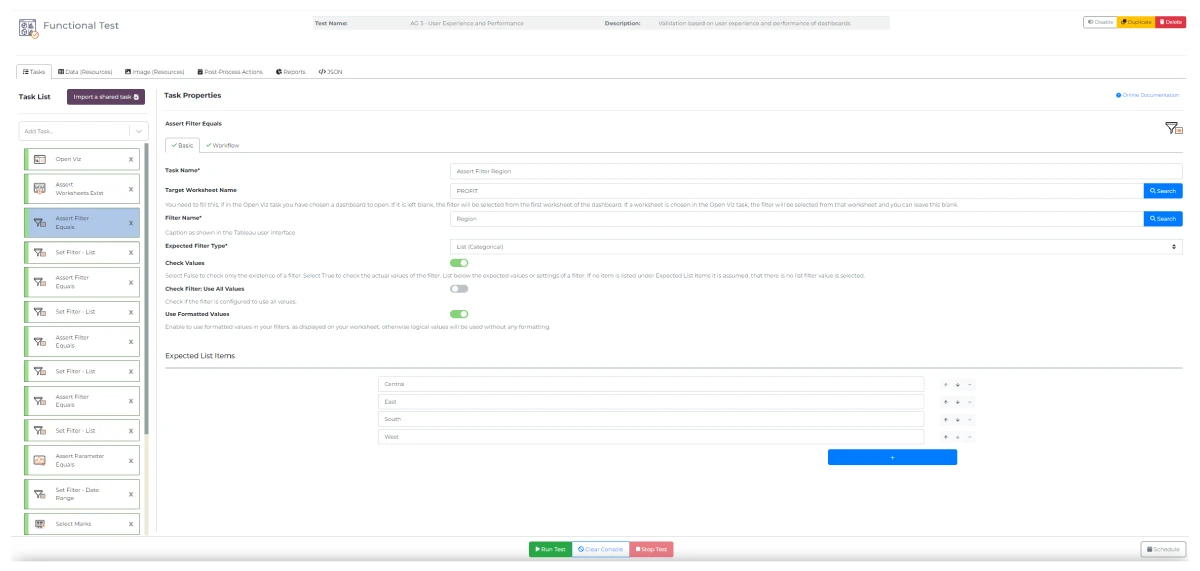
Setting up your functional test tasks in Wiiisdom for Tableau
What’s more is that all functional validation tasks can be automated in Wiiisdom for Tableau, with the ability to run them on any basis that you want (even if new objects are added to a dashboard). You can even take advantage of AI to generate your Wiiisdom for Tableau test plan, and then use scheduling and automation to run the test.
The following are other scenarios where functional testing is beneficial:
- Into your CI/CD or QA (quality assurance) cycle: It allows you to monitor dashboards in the background to find any problems before users do. Using this validation capability for your CI/CD cycle also speeds up release cycles, reduces time to market thanks to automation and testing, and increases trust among users.
- In your ticketing system: This allows you to move from reactive to proactive and fix any issues before your users see them.
- To build trust: Certifying or de-certifying your Tableau content through functional validation ensures the content can be trusted for decision-making. More information on dashboard certification can be found here.
Are You Ready To Test?
Functional testing is the first type of validation you should be doing on your Tableau dashboards because a non-working dashboard is the first thing users will notice, and it won’t help in increasing user adoption. It’s equally the most complete in terms of what tasks you can carry out, with many features to fully simulate a user journey.
Frequently Asked Questions: Functional Testing for Tableau Dashboards with Wiiisdom
1. What is functional testing for Tableau dashboards?
Functional testing for Tableau dashboards checks that your dashboards are reliable and user-friendly by validating four key areas:
- Data Freshness: Ensures data is always up-to-date.
- Business Rules: Confirms calculations and filters work as intended.
- Data Reconciliation: Verifies dashboard data matches the source.
- User Experience & Performance: Tests interactivity and speed for a seamless user journey.
This helps catch issues before users do and builds trust in your analytics.
2. Why is functional testing important for Tableau?
Functional testing ensures dashboards are reliable, interactive elements work, and data is displayed correctly. This builds user trust, increases adoption, and reduces support tickets by proactively identifying and resolving issues.
3. How does Wiiisdom automate functional testing for Tableau?
Wiiisdom for Tableau allows you to create automated test cases that mimic user journeys. Tests can be scheduled or triggered by dashboard updates, and results are delivered via email or collaboration tools like Slack and Teams. Automation ensures continuous quality without manual intervention.
4. Is it possible to customize or schedule tests?
Absolutely. You can customize test cases to reflect your organization’s unique user journeys and schedule them to run at any frequency, on demand, on a schedule, or in response to specific events.
5. How does functional testing fit into Analytics Governance?
Functional testing is a key pillar of Analytics Governance, ensuring that dashboards are reliable, compliant, and trusted. By automating these checks, organizations can maintain high standards for analytics quality and user satisfaction.
6. How long does it take to create a test in Wiiisdom for Tableau?
Tests in Wiiisdom for Tableau can be generated thanks to your own GenAI product or can be programmatically coded, so that the test creation process is sped up.