Why Git Alone Isn’t Enough For Automated Tableau Version Control
Why Version Control For Tableau Needs More Than One Solution
Version control has become a critical challenge for organizations using Tableau, especially as dashboards are integrated into corporate reporting and subject to regulatory compliance (finance, healthcare, etc.). Data & Analytics teams tend to turn to Git for versioning because it’s familiar and powerful for development workflows. However, it has certain limitations, and in this blog post, we will see that when paired with Wiiisdom Tableau Version Management, it offers the perfect compromise: Git provides the structure and collaboration needed during dashboard development, while Wiiisdom ensures governance and compliance when content is in production. The combination of these two tools enables robust, compliant, and accessible version control from the development phase through to production.
What’s the difference between Git and Wiiisdom Tableau Version Management?
What is Git for Tableau?
If you’re reading this article, you probably know what Git is. In the context of Tableau, many organizations use Git because they already use it elsewhere in the organization, so extending that workflow to Tableau feels natural, especially for developers (Tableau Creators) and data sources. It allows teams to collaborate, branch, and merge changes before dashboards are ready for production.
However, Tableau dashboards are XML files, and Git was never designed for this format. Merge conflicts, manual pushes, and complex workflows make Git cumbersome for Tableau content. It can’t be used enterprise-wide either due to its inability to replicate Tableau’s security model. Managing renamed or moved files in Git is notoriously complex, and deleting specific versions for legal or compliance reasons is even harder. In addition, repositories can grow uncontrollably with limited options for storage management.
What is Wiiisdom Tableau Version Management?
Wiiisdom Tableau Version Management is purpose-built for Tableau and was co-innovated in partnership with Tableau. Using Tableau APIs, it automatically scans and captures every new version. No manual pushes and no missed versions. Our solution fully leverages Tableau’s native security model, ensuring sensitive dashboards remain protected in production, which is non-negotiable in regulated environments.
Wiiisdom Tableau Version Management makes version control easily accessible, not just for developers but also for business users and auditors, with the capabilities to:
- Have unlimited, undeletable version history with full audit trails.
- Easily rollback, preview, and compare versions with no technical expertise required.
- Support regulatory requirements (GxP, SOX, FISMA, EUC, etc.) with traceability and documentation, for example, of business logic for EUC compliance.
How do Git and Wiiisdom Tableau Version Management Work Together?
Git and Wiiisdom Tableau Version Management operate at different points in the Tableau content lifecycle. When the goal during the development phase is to respond to identified use cases, these same goals change once the product is made available to consumers. The goal now is to ensure the availability and integrity of dashboards, making it essential to implement governance processes, maintain compliance, and build trust, particularly in regulated sectors such as finance and healthcare. Missing a version is a compliance risk that can lead to serious consequences.
Here I’ll explain how Git and Wiiisdom Tableau Version Management solutions can be implemented together for end-to-end version control:
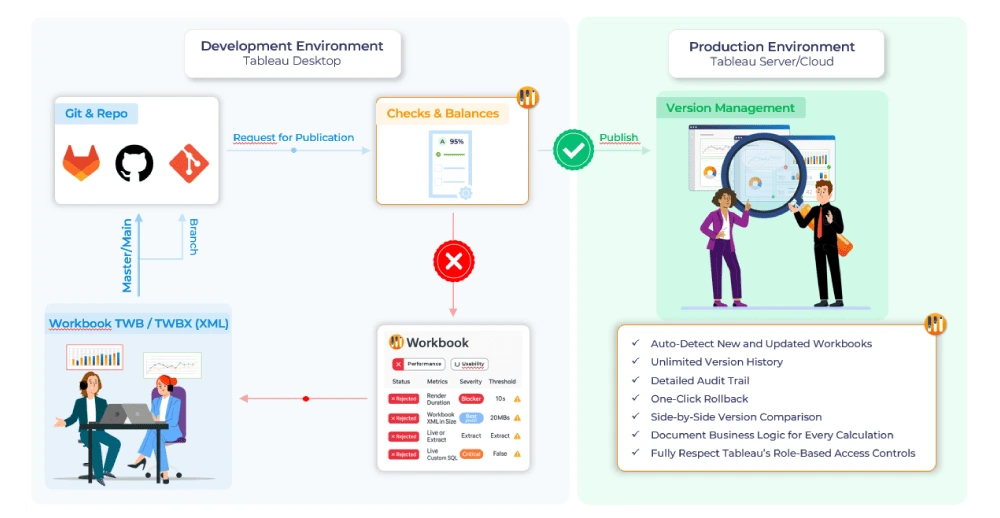
- Development Phase (Git):
- Developers collaborate on Tableau dashboards in a development environment using Git.
- Git enables branching, merging, and managing multiple versions during the build and test phase.
- Ideal for code-centric workflows and developer collaboration.
- Transition to Production Phase (Wiiisdom Tableau Version Management):
- Once a dashboard is ready for production, Wiiisdom takes over.
- Wiiisdom automatically detects and versions every change, regardless of how it was made (web authoring, publishing, etc.).
- No manual intervention is required, so it ensures no version is missed.
- Wiiisdom’s solution maintains a complete audit trail for every production dashboard.
- Compliance & Audit in the Production Phase (Wiiisdom Tableau Version Management):
- All version history and audit logs are accessible to business users and auditors.
- Supports regulatory requirements by ensuring traceability, security, and data integrity.
- Easy to document business logic, transformations, and approvals for each version.
Your Path to Complete Tableau Version Control
Version control in Tableau isn’t a one-size-fits-all challenge. Git and Wiiisdom Tableau Version Management were built for different purposes, and when implemented together, they provide end-to-end version control for Tableau. Organizations should leverage Git for development and Wiiisdom Tableau Version Management for production and regulatory requirements, ensuring robust, compliant, and user-friendly version management across the Tableau lifecycle.
Curious to see our solution in action? Get in touch today.
Frequently Asked Questions
1. What is Git, and why do organizations use it with Tableau?
Git is a widely adopted version control system that helps developers manage changes to code and files. In the context of Tableau, organizations use Git to collaborate on dashboard development, track changes, and maintain a history of edits during the build phase.
2. What is Wiiisdom Tableau Version Management?
Wiiisdom Tableau Version Management is a purpose-built solution for Tableau dashboards. It automatically captures every version, maintains audit trails, and ensures compliance with regulatory requirements. Unlike Git, it is designed for business users and auditors, making version control accessible and secure in production environments.
3. Can Git and Wiiisdom Tableau Version Management be used together?
Yes! Git is ideal for development workflows, while Wiiisdom Tableau Version Management takes over in production. Using both solutions together provides complete coverage for the Tableau dashboard lifecycle, from collaborative development to robust governance and compliance.
4. What are the main benefits of combining Git and Wiiisdom Tableau Version Management?
By leveraging Git for development and Wiiisdom for production, organizations gain agility, collaboration, and innovation in the build phase, plus governance, security, and compliance in production. This dual approach delivers the best of both worlds for Tableau version control.
5. How does Wiiisdom Tableau Version Management support compliance and audit requirements?
Wiiisdom Tableau Version Management automatically tracks every version and change, preserves Tableau’s native security model, and provides easy access to audit logs. This makes it simple for organizations to meet regulatory requirements like GxP, SOX, EUC, and FISMA.