Power BI Path to Production: How to Deploy Trustworthy and Reliable Content

Summary:
This article explains why a governed Path to Production is essential for delivering reliable, high‑quality Power BI content. It outlines the risks of unmanaged deployments and shows how moving reports through a structured Dev → QA → Production workflow, supported by a ticketing system‑triggered validation and automated checks, helps teams maintain a clean, stable, and trustworthy Power BI environment. By enforcing quality gates, approvals, and monitoring, organizations reduce chaos, strengthen Power BI deployment governance, and ensure business users always receive accurate, performant reports.
Path to Production: The key to clean, reliable Power BI deployments
As organizations scale their use of Power BI, the need for a clear, repeatable, and controlled deployment process becomes essential. A path to production is the mechanism that governs Power BI content, whether that be for a brand‑new report or an update to an existing one. A path to production process moves Power BI content safely from Development → QA/Test → Production. It ensures that only validated, approved, high‑quality content reaches business users.
Imagine your Power BI environment as a crystal‑clear swimming pool. Everyone wants to jump into a pool that is clean. But the real secret isn’t just the pool, it’s the hose filling it. If the water flowing through the hose isn’t checked for quality, the pool will quickly turn cloudy. In the same way, every piece of new or updated Power BI content that enters your “production pool” must pass through a controlled, high‑quality Path to Production. Without those checks at the hose level, your once‑clear environment becomes polluted fast.
This shift from a reactive approach (fixing issues after they reach production) to a proactive one (preventing issues early through automated validation and governance) is what modern Power BI teams need to scale self‑service without losing control.
The Problem: Power BI Without Governance
When governance hasn’t been established, your Power BI environment can quickly turn into the wild west, with common challenges that bring:
- No visibility into who publishes what content.
- Anyone can modify reports directly in Production, sometimes unintentionally causing disruptions.
- No validation or endorsement process, meaning issues surface only after business users complain.
- Frequent performance or design regressions as reports and semantic models evolve (often due to noisy neighbors where one badly designed content impacts other capacity users, creating downtime for critical reports).
- Platform teams are overwhelmed by ad‑hoc support requests and reactive troubleshooting.
- Platform outages and capacity throttling that impact business users and reporting workflows.
One of our customers, a large financial institution, provides a perfect example. After years of chaotic BI deployments on another platform, where users could publish anything, anywhere, they refused to repeat the same mistakes with Power BI. Their platform team was exhausted with users constantly complaining. BI content was inconsistent, unpredictable, and difficult to trust. However, implementing a Power BI Path to Production as part of a wider Lifecycle Management strategy with Wiiisdom for Power BI became the foundation for rebuilding their BI ecosystem: reliable, governed, and scalable, without sacrificing the flexibility that business users value.
What does a Path to Production Process Look Like?
A mature Power BI deployment governance framework relies on a clear, structured content lifecycle:
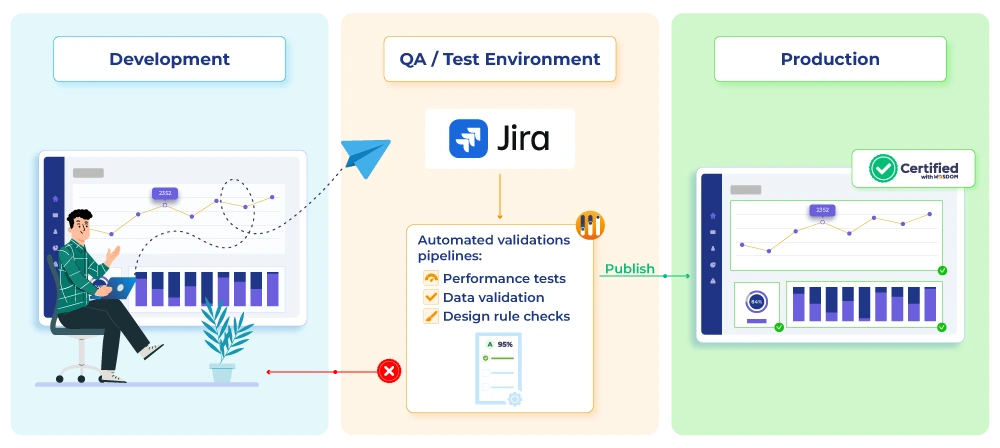
Development
- Developers build or update content in dedicated Dev workspaces.
- No direct publishing to Production is allowed.
QA / Test Environment
When a report is ready to move forward:
1. A ticket is opened on your ticketing system, for example, Jira or ServiceNow (let’s use Jira for this example).
The developer submits a deployment request that includes:
- The report or dataset location
- Relevant environment details
- Whether it is a new asset or an update to an existing one.
2. Jira Triggers Automated Validation Pipelines
Once the ticket reaches the appropriate status, Jira triggers automated pipelines via Wiiisdom. These pipelines perform:
- Performance tests (rendering, DAX, heavy visuals)
- Data validation (row count, dataset refresh, key business metrics)
- Design rule checks (naming conventions, formatting, metadata)
If any validation step fails, the Wiiisdom Cloud Platform updates the ticket directly within your ticketing system by adding a comment to indicate a failed result. The existing ticket is enriched with the validation outcome (Pass/Fail), ensuring full traceability within a single deployment request. This prevents flawed content from reaching business users. If all tests pass, Wiiisdom moves the content automatically…if you wish. Certain customers are implementing an additional layer of quality assurance by establishing a validation committee to evaluate whether the BI asset delivers value and effectively addresses business requirements.
Promotion to Production
Only once content has:
- Passed all validations,
- Been reviewed,
- Received approval in Jira,
Wiiisdom performs an automated, auditable, consistent deployment to the Production workspace.
Production now becomes a stable, reliable environment with a full history of what was deployed, by whom, and when.
What are the Key Principles of a Mature Path to Production for Power BI?
A well‑designed Power BI deployment process is built on several core principles:
- No direct creation or modification in production.
- One unified workflow for all Power BI deployments.
- Move from manual → automated deployment.
- Design & performance validation, both pre‑ and post‑deployment.
- Full integration in the existing eco-system to ensure a smooth process for the end-users without system/IT bottlenecks, and with clear standards definition and criteria.
What are the benefits of path to production?
For Developers
- Clear expectations
- Faster, automated promotion
- Fewer back‑and‑forth errors
For Platform & Governance Teams
- No more “Wild West.”
- Reliable and accurate environments
- Centralized audit trails
- Less firefighting, more strategic work
- Lower costs thanks to optimized new BI assets
For Business Users
- Faster, more reliable reports
- Confidence that reports are accurate & performant
- Consistent user experience
Ready to put in place a path to production deployment?
Implementing a Path to Production for Power BI is no longer optional for organizations that want scalable, trustworthy analytics. It provides the framework needed to transition from chaotic, ad‑hoc report updates to a disciplined, automated, and auditable deployment pipeline. By integrating Power BI with your change management process or ticketing system and Wiiisdom, organizations ensure quality, consistency, compliance, and long‑term scalability across every report.
If you want to see how Wiiisdom can help you implement a path to production for your Power BI environment, get in touch with us.
Frequently Asked Questions
1. What is a Path to Production for Power BI?
A Path to Production is a governed workflow that moves Power BI content safely from Development → QA/Test → Production. It ensures that reports and datasets are validated, approved, and consistently deployed so only high‑quality content reaches business users.
2. Why do organizations need a governed Path to Production?
Without governance, Power BI environments often become chaotic, where anyone can publish content, issues reach users before being detected, and poorly designed reports may impact capacity (“noisy neighbors”). A governed Path to Production reduces risk, prevents outages, and improves trust in analytics.
3. What common problems occur when Power BI deployments are unmanaged?
Uncontrolled environments face issues such as:
- Lack of visibility on who publishes what
- Direct edits in Production
- No validation checks or endorsement process
- Performance regressions
- Platform team overload from ad‑hoc asks
- Capacity throttling or outages caused by flawed content
4. What types of validation should be performed before deploying Power BI content?
A mature deployment includes:
- Performance testing (rendering, DAX, heavy visuals)
- Data validation (metrics, refresh, row counts)
- Design rule checks (naming, formatting, metadata standards
These checks help prevent downtime, errors, regressions, or user‑reported issues.
5. How do ticketing systems such as Jira or ServiceNow fit into the deployment process?
The workflow typically begins with a deployment ticket. Once the ticket reaches the correct status, validation pipelines run automatically, and results (Pass/Fail) are written back into the same ticket for full traceability and approval.